How to export a Discord thread
How do I export a Discord thread?
- 1
Open discord.com in Chrome, Firefox or Edge and sign in.
- 2
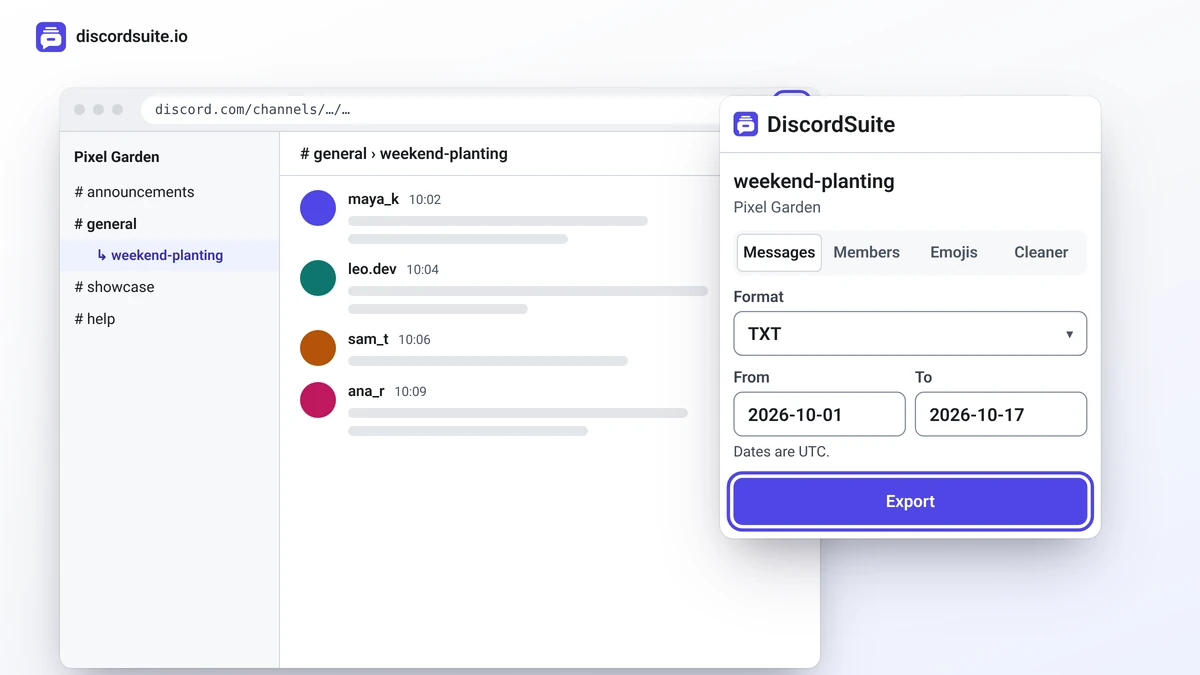
Open the thread so its own URL shows in the address bar.
- 3
Click the DiscordSuite icon and stay on the Messages tab.
- 4
Choose a format: HTML, PDF, Excel, CSV, JSON or TXT.
- 5
Optional: set From and To dates, the first or last N messages, or Filters.
- 6
Click Export and save the file.
When the thread was started from a message in the parent channel, DiscordSuite adds that starter message as context. For example, a TXT file opens with a "Thread started from:" line, and a CSV file has a ThreadParent column. Threads started without a message have no starter context.
What do I need?
- Chrome, Firefox or Edge on a computer.
- A Discord account that can open and read the thread. You don't need to be a server admin.
- DiscordSuite for Chrome, Firefox or Edge. Exporting a thread works on the free plan.
How DiscordSuite works covers installing and pinning the extension.
How do I open the correct thread?
The thread must be the open conversation, with its own /channels/… URL in the address bar. Click the thread's name in Discord to open it. If you open only the parent channel, DiscordSuite exports the parent channel, not the thread.
Which format should I use?
| Format | Best for |
|---|---|
| HTML | Reading. One file that looks like Discord, in an auto, light or dark theme |
| A PDF file of the thread, to print or file | |
| TXT | A plain log, one line per message: [timestamp] author: message |
| CSV or Excel | Sorting and filtering in a spreadsheet |
| JSON | Scripts and other tools |
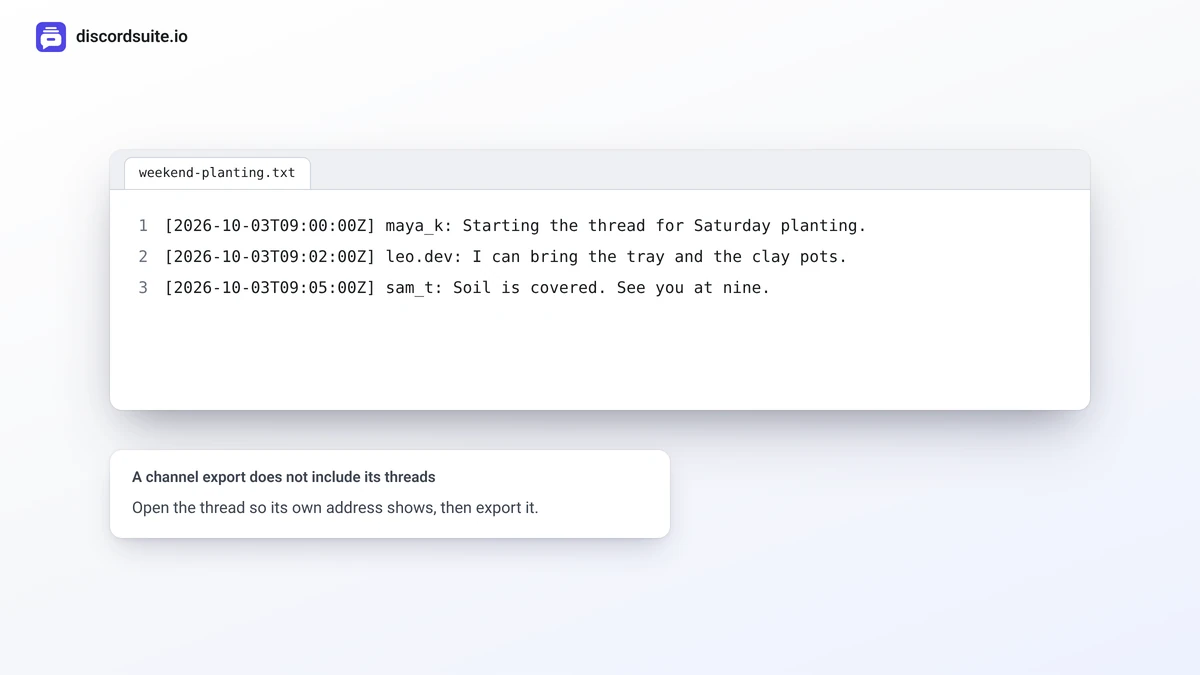
The export formats page lists what each file contains, and How to export a Discord chat to Excel or CSV explains the columns. Need a PDF? Pick PDF in the Format menu and click Export. See How to save a Discord chat as a PDF. To keep a thread as a record, with timestamps and files, see the record guide. That page is not legal advice.
How do I limit or filter the thread?
Dates
From and To are in UTC, and both days are included.
Message count
the first or last N messages.
Filters
keep one author's messages, text, attachments, links, mentions or pins. See message filters.
Leave all of these empty to export the whole thread your account can see. How to export part of a Discord chat shows each option step by step. The free plan has a lifetime message total. A paid Chat Exporter or All tools license removes that cap and can pack the attachments in one ZIP with Download attachments. Compare plans.
Does a channel export include its threads?
No. Exporting a channel saves that channel's messages, not the threads under it. Open each thread and export it, or use the several-channels picker. With Chat Exporter (or the All tools bundle), tick Export several channels and tick the threads you want. Each thread saves as its own file. See How to back up Discord server messages. The picker lists active threads first, then loads archived threads, tagged Archived or Locked. On a very large server, the archived list can stop before it reaches every thread. If a thread is missing from the list, open it in Discord and export that open conversation.
What if the wrong conversation is selected?
"No channel open"
click into the thread so the URL shows
/channels/…."Could not read your Discord session"
reload Discord and try again.
"Rate limited by Discord"
wait a few minutes.
For a regular channel, How to export a Discord chat has the same steps.
Frequently asked questions
How do I export a Discord thread?
Open the thread so its own URL is in the address bar, open DiscordSuite, choose a format, and export. You get messages your account can still see.
Can I export a Discord thread as a text file?
Yes. Open the thread directly and choose TXT.
Must I be a server administrator?
No. You need an account that can open and read the thread. DiscordSuite does not bypass Discord permissions.
Does exporting a channel automatically include its threads?
No. Open each thread, or select those threads in the several-channels picker.
Can I export a thread with its attachments?
Use Download attachments with Chat Exporter or All tools so the export and the files come in one ZIP. Media only saves files without a chat file.
Can I filter a thread by date or author?
Yes. Use From/To dates (UTC, both days included), first or last N, or message filters, including From author.
Can I export an archived or private thread?
If your account can still open and read it, you can export that open thread. Private threads are supported when you can open them. The several-channels picker also lists archived threads after they load, and may not list every archived thread on a very large server.
Can I export a thread I can no longer open?
No. DiscordSuite only exports conversations your account can still open.
Related: How to export a Discord chat · How to save a Discord chat as a PDF · How to download all attachments from a Discord channel · How to delete your own Discord messages in a server · Export formats · How DiscordSuite works