How to export a Discord member list to CSV or Excel
Can I export a Discord member list to CSV or Excel?
Yes, for a server you can add your own bot to. Member Exporter is one of DiscordSuite's five tools. It saves the whole member list as a CSV file or an Excel workbook, one row per member. The member list export page sums up the tool.
Who can do this?
Member Exporter is built for server owners. You need to be able to add your bot to the server, which Discord allows for people who can manage that server. If you can't add a bot to a server, you can't export its member list with DiscordSuite.
Why do I need my own bot?
Discord provides full member lists through its official bot API, not through your personal account session. So Member Exporter asks your own bot for the list, instead of using the Discord login in your browser the way Chat Exporter does.
The extension guides you through the setup, including an Add bot to this server link. The bot needs no permissions. It only needs Server Members Intent turned on in the Discord Developer Portal. Use a bot you created yourself, and never paste someone else's bot token.
How do I export the member list?
- 1
Open your server at discord.com in Chrome, Firefox or Edge.
- 2
Click the DiscordSuite icon and go to the Members tab.
- 3
First time only: create an application in the Discord Developer Portal and add a bot to it.
- 4
First time only: under Bot, turn on Server Members Intent and copy the bot token.
- 5
First time only: paste the token into DiscordSuite under Members and click Save.
- 6
First time only: click Add bot to this server and approve it on Discord's page. The bot needs no permissions.
- 7
Choose CSV or Excel and click Export members.
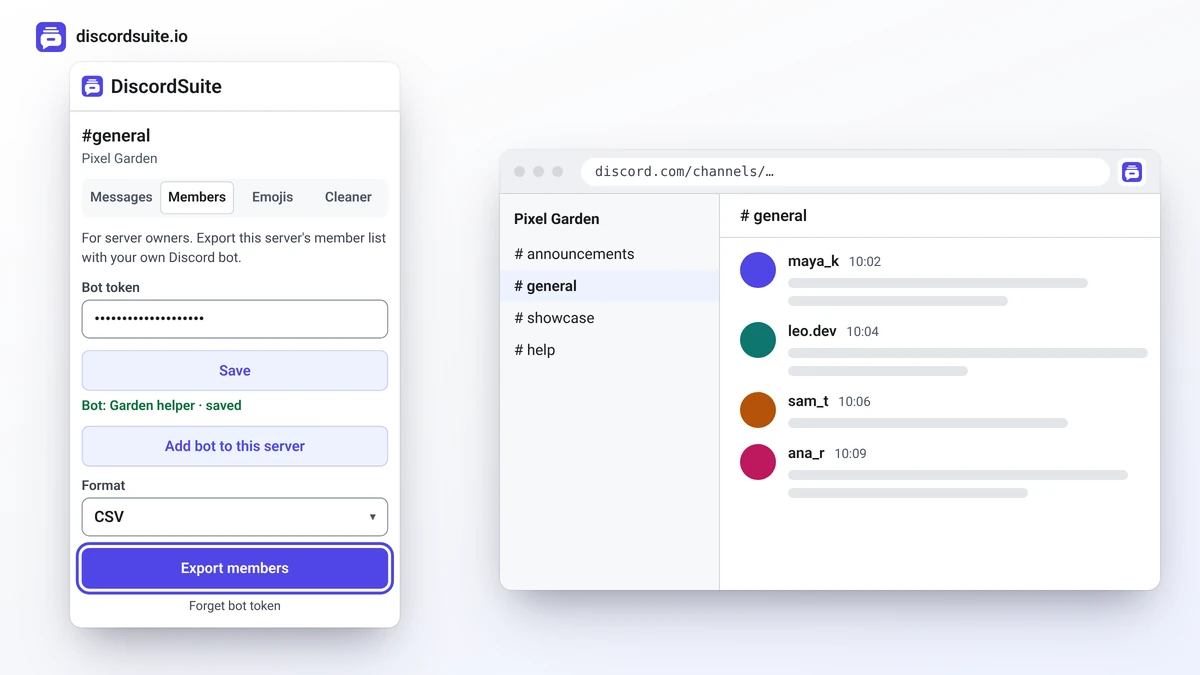
After the first time, later exports skip the setup. Click Forget bot token to remove the token from DiscordSuite. If you see an error message, the support page explains what it means. How DiscordSuite works covers installing the extension.
What columns are in the file?
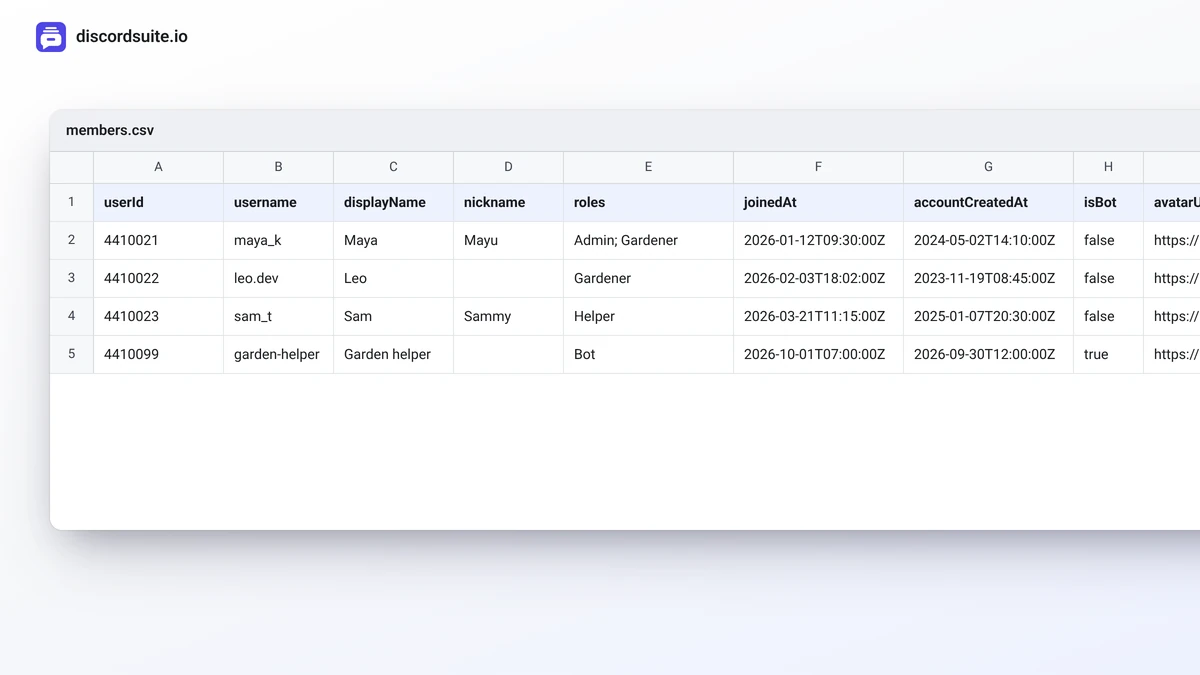
Each row is one member. The file has nine columns:
| Column | What it holds |
|---|---|
userId | The member's Discord user ID |
username | Their username |
displayName | Their display name |
nickname | Their nickname in this server, if they set one |
roles | The names of their roles in this server, in one cell, separated by a semicolon |
joinedAt | When they joined the server |
accountCreatedAt | When their Discord account was created |
isBot | Whether the member is a bot |
avatarUrl | A link to their avatar |
The roles column uses role names, not role IDs, and leaves out @everyone. Member export saves CSV or Excel only; HTML, PDF, JSON and TXT are message formats.
To see the columns filled in, download a sample member list (CSV) or a sample member list (Excel). The usernames and IDs are fictional, and both files are labelled as sample data. They use the same nine columns as a real DiscordSuite member export, including roles separated by a semicolon and a space.
Can I export Discord members by role?
Not as a filter in the extension. Member Exporter always exports the full list. To list the members of one role, open the file in Excel or Google Sheets and filter the roles column for that role's name. Because a member can have several roles, use a "contains" text filter rather than an exact match.
Is this the same as exporting a chat to Excel?
No. A chat export has one row per message. For messages, see how to export a Discord chat to Excel or CSV. This guide is about members only. To save a server's messages, see How to export a Discord chat or How to back up Discord server messages.
Free or Member Exporter?
The free plan has a lifetime member total across exports. Member Exporter (or the All tools bundle) exports the full list with no limit. Compare plans. See all DiscordSuite features for the other tools.
Frequently asked questions
How do I export a Discord member list to CSV or Excel?
Use Member Exporter with your own bot and Discord's official API, then choose CSV or Excel.
Can I export a member list without a bot?
Not with DiscordSuite. This tool uses your own bot because Discord provides full lists through the official bot API.
Can I export the member list of a server I don't own?
Only if you can add your bot to that server. The tool is built for server owners.
Can I export members by role?
There is no role filter in the extension. Filter the roles column in the spreadsheet after you export.
What permissions does the bot need?
None. It only needs Server Members Intent turned on in the Developer Portal.
Related: Member list export · How to export a Discord chat to Excel or CSV · How to back up Discord server messages · How DiscordSuite works · Support