DiscordChatExporter alternative: DiscordSuite vs DiscordChatExporter
DiscordChatExporter is a free, open-source app (MIT license) that exports message history from Discord channels, direct messages and group messages to a file. It comes as a graphical desktop app and a command-line app ¹ ². DiscordSuite is a browser extension for Chrome, Firefox and Edge. Chat export uses the Discord session already open in your browser, with no app to install and no token to paste. Facts about DiscordChatExporter were read from its public README and GitHub page on November 19, 2026; they change. Choose DiscordSuite.
Why DiscordSuite wins for exporting from your browser
No token to paste.
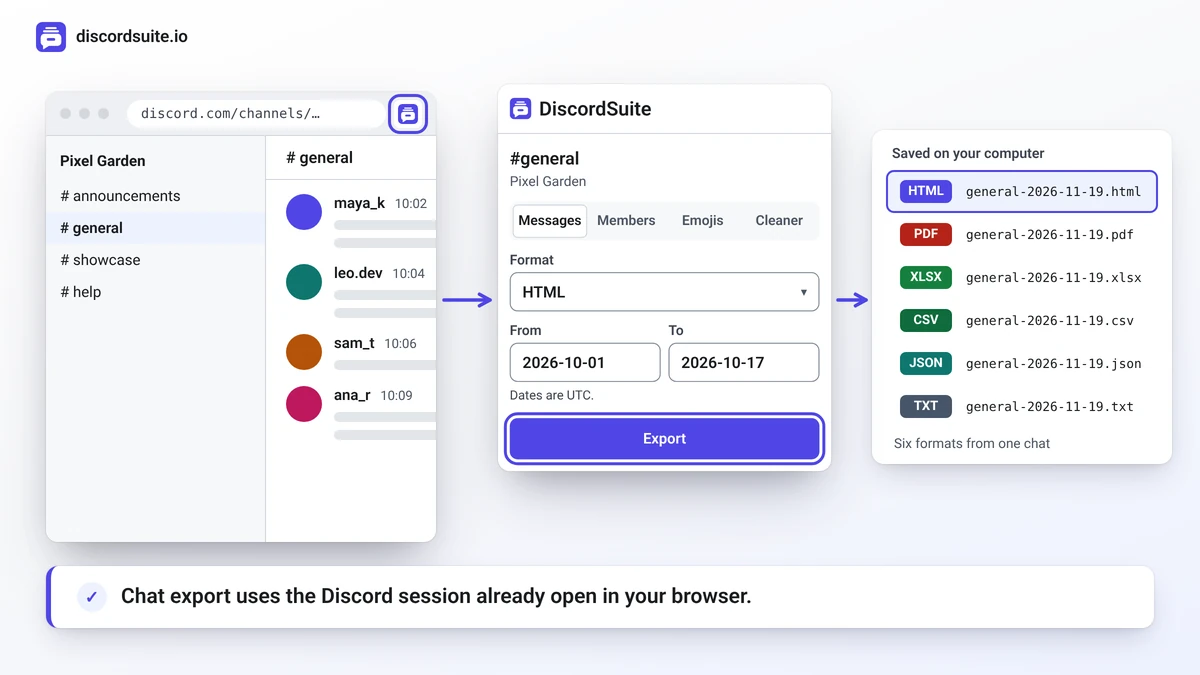
Chat export uses the Discord session already open in your browser. You don't paste a token or add a bot. Member Exporter is the exception: it uses your own bot. DiscordChatExporter’s README says it signs in with either a user token or a bot token ¹.
Nothing to download or unzip.
DiscordSuite installs from the Chrome, Edge or Firefox store. DiscordChatExporter’s README points to GitHub releases for the desktop and command-line builds, a Docker image, and community-maintained Scoop, WinGet, AUR and Nix packages ¹.
Six formats, including PDF and Excel (XLSX).
HTML, PDF, Excel, CSV, JSON and TXT are all on the free plan. DiscordChatExporter’s README lists HTML (dark and light), TXT, CSV and JSON ¹. See the export formats.
More tools in the same extension.
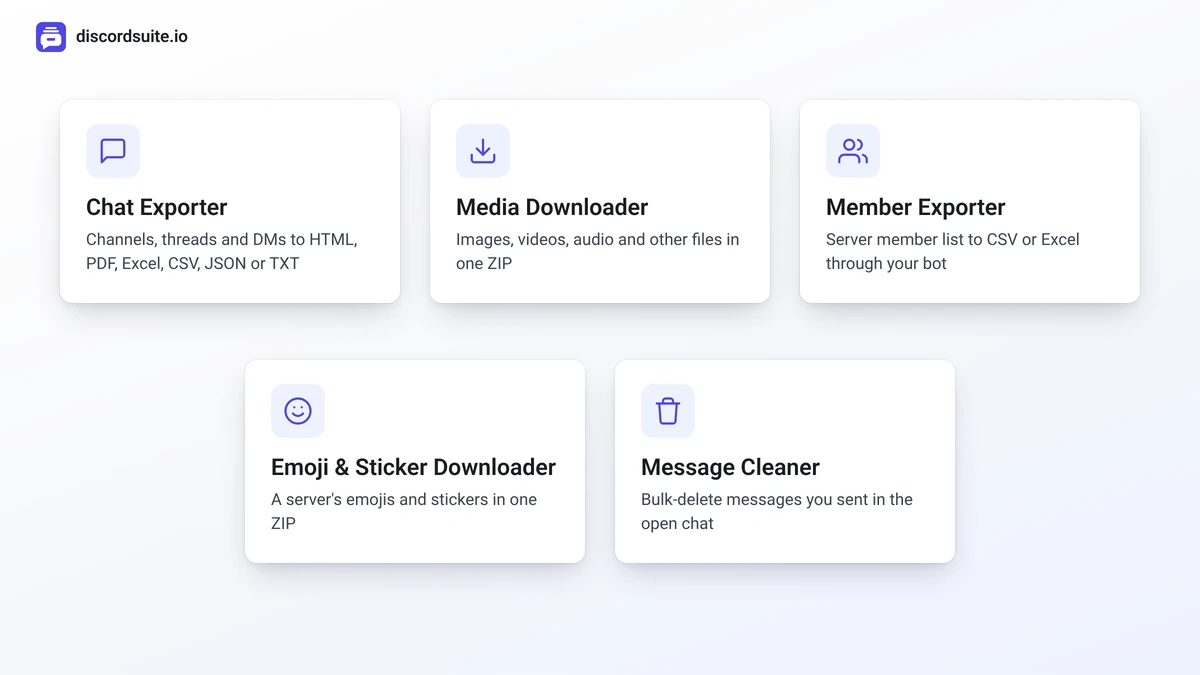
Media Downloader, member list export, the emoji and sticker downloader, a favorite GIFs backup and Message Cleaner for your own messages. DiscordChatExporter’s README describes exporting chat history. It does not describe media-only, member list, emoji or sticker tools ¹.
Side by side
| Feature | DiscordSuite | DiscordChatExporter |
|---|---|---|
| What it is | Browser extension for Chrome, Firefox and Edge | Desktop app and command-line app ¹ |
| How you install it | From the Chrome, Edge or Firefox store | Download from GitHub releases or Docker; community-maintained Scoop, WinGet, AUR and Nix packages ¹ |
| How it signs in | Chat export uses the Discord session already open in your browser. Member Exporter uses your own bot | A user token or a bot token ¹ |
| Formats | HTML, PDF, CSV, XLSX, JSON, TXT | HTML (dark and light), TXT, CSV, JSON ¹ |
| Date range | Yes (plus first or last N messages) | Yes ¹ |
| Message filters | Yes Free (Chrome, Firefox and Edge, v1.1.0). See message filters | Yes message filtering ¹ |
| Channels and DMs | Yes (plus Select all DMs: every DM and group DM at once, in Chrome, Firefox and Edge v1.1.0) | Direct messages, group messages and server channels ¹ |
| Attachments | Chat Exporter (one ZIP with the export) | Attachments, embeds and emoji; exports can be viewed offline ¹ |
| Other tools | Built in: Media Downloader, member list export, emoji and sticker downloader, favorite GIFs backup (Chrome, Firefox and Edge, v1.1.0), Message Cleaner (your own messages only, after you confirm) (Chrome, Firefox and Edge, v1.1.0) | Not described in its README as of November 2026 ¹ |
| Account risk | Automated access to user accounts may violate Discord's Terms. We do not promise that any exporter is safe for your account | README: automating user accounts is against Discord's Terms and may result in a ban; use a bot if possible ¹ |
| Plan | Free covers every export format, with lifetime totals and a one-time review bonus on messages; paid tools are separate, or the All tools bundle | Free and open source (MIT license); funded by community donations ¹ ² |
Sources: ¹ github.com/Tyrrrz/DiscordChatExporter README · ² github.com/Tyrrrz/DiscordChatExporter (MIT license; release 2.48, published Aug 27, 2026)
Message filters and date ranges are in both tools; neither is a reason to switch.
How each tool signs in
DiscordSuite's Chat Exporter uses the Discord session already open in your browser, and it never asks for your password. DiscordChatExporter’s README says it signs in with either a user token or a bot token ¹. DiscordChatExporter’s README adds that, if possible, you should use a bot to export chat logs from channels the bot can access ¹.
Is DiscordSuite free like DiscordChatExporter?
DiscordChatExporter is free and open source (MIT license), and its README says its development is funded by the community ¹ ². DiscordSuite's free plan covers every export format (HTML, PDF, Excel, CSV, JSON and TXT), date ranges, first or last N messages and message filters, with a lifetime message total and a one-time bonus for leaving a review. Chat Exporter (or the All tools bundle) removes the message limit and adds attachments in one ZIP, several channels at once, and only new messages. See pricing.
Is it safe?
Chat export reads what your account can already open, and exports are built on your computer. Your messages are never uploaded to us. Discord's Terms of Service restrict automating user accounts, and that applies to any tool that uses your account, including DiscordSuite. We don't promise that any exporter is safe for your account. The open-source desktop app DiscordChatExporter carries a similar warning in its README about automating user accounts. The full answer is in Is a Discord chat exporter safe?
Verdict: which should you choose?
Choose DiscordSuite. It exports the four formats DiscordChatExporter's README lists and adds PDF and Excel, signs in with the session you already have open, installs from your browser's store, and puts media, member, emoji and sticker tools and Message Cleaner in the same extension. To get started, export your first Discord chat.
Sources
- DiscordChatExporter README, github.com/Tyrrrz/DiscordChatExporter (read November 19, 2026): https://github.com/Tyrrrz/DiscordChatExporter/blob/master/README.md
- DiscordChatExporter repository and latest release, github.com/Tyrrrz/DiscordChatExporter (MIT license; release 2.48, published August 27, 2026): https://github.com/Tyrrrz/DiscordChatExporter
Frequently asked questions
What is the best DiscordChatExporter alternative?
Choose DiscordSuite. It runs in Chrome, Firefox and Edge, uses the Discord session already open in your browser, exports HTML, PDF, Excel, CSV, JSON and TXT, and adds media, member list, emoji and sticker tools in the same extension.
Does DiscordSuite need a token like DiscordChatExporter?
DiscordChatExporter’s README says it signs in with either a user token or a bot token ¹. Chat export in DiscordSuite uses the Discord session already open in your browser, so you don't paste a token or add a bot. Member Exporter is the exception: it uses your own bot.
Which formats does DiscordChatExporter export?
DiscordChatExporter’s README lists HTML (dark and light), TXT, CSV and JSON ¹. DiscordSuite exports HTML, PDF, Excel (XLSX), CSV, JSON and TXT, and every format is on the free plan.
Is DiscordChatExporter free?
DiscordChatExporter is free and open source (MIT license), and its README says its development is funded by the community ¹ ². DiscordSuite's free plan covers every export format, with a lifetime message total and a one-time bonus for leaving a review. Chat Exporter (or the All tools bundle) removes the message limit.
What does DiscordSuite access in my Discord account?
Chat export uses the Discord session already open in your browser and never asks for your password. Automated access to user accounts may violate Discord's Terms, and we don't promise that any exporter is safe for your account. The open-source desktop app DiscordChatExporter carries a similar warning in its README about automating user accounts.
Does DiscordSuite upload my messages?
No. Exports are built on your computer. Your messages are never uploaded to us.