Undiscord alternative: DiscordSuite Message Cleaner vs Undiscord
Undiscord is a userscript for deleting the messages in a Discord channel or DM, not a browser-store extension. Undiscord’s README tells you to install a userscript manager such as Tampermonkey or Violentmonkey first, then add Undiscord from Greasy Fork or OpenUserJS ¹. DiscordSuite's Message Cleaner is a browser extension for Chrome, Firefox and Edge that deletes only your own messages in the open chat, after you scan, type DELETE and tick a confirmation. Facts about Undiscord were read from its public README and Greasy Fork page on November 19, 2026; they change. Choose DiscordSuite.
Why DiscordSuite wins for deleting your own messages
No userscript manager.
Message Cleaner installs from the Chrome, Edge or Firefox store with the rest of DiscordSuite. Undiscord’s README lists userscript managers for Brave, Chrome, Firefox, Opera and Edge ¹.
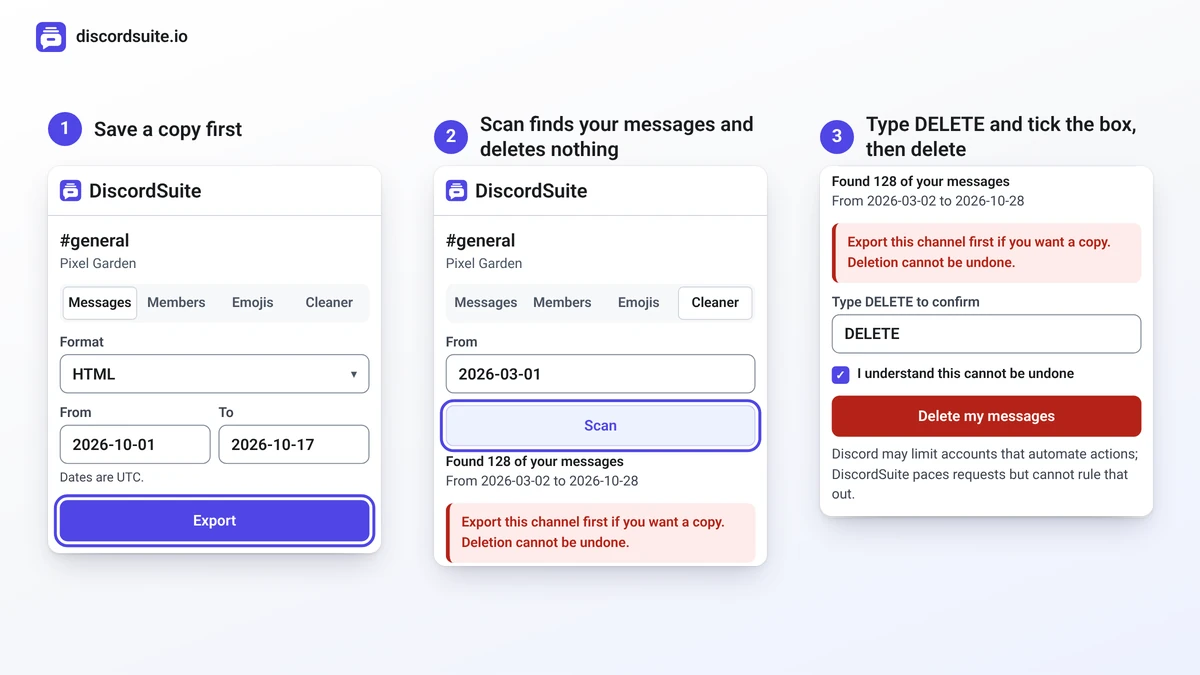
Save a copy first.
Chat Exporter is in the same extension, so you can export first, then clean up. Undiscord’s README describes deleting messages. It does not describe exporting them ¹.
Scan, then delete.
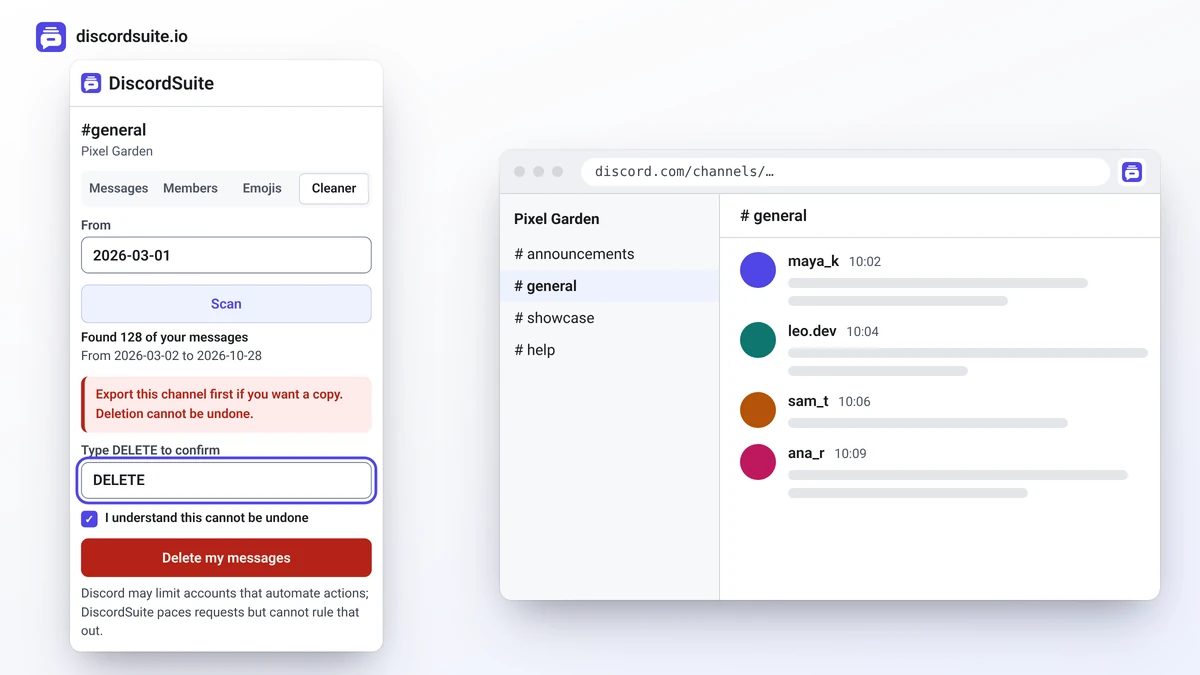
Scan shows how many of your messages it found and their date span, and deletes nothing. You then type DELETE and tick I understand this cannot be undone. Undiscord’s README says to open Discord in your browser (not the app), go to the channel or DM, click the trash button added in the top right, click the buttons near Author ID, Server ID and Channel ID, then click Delete ¹.
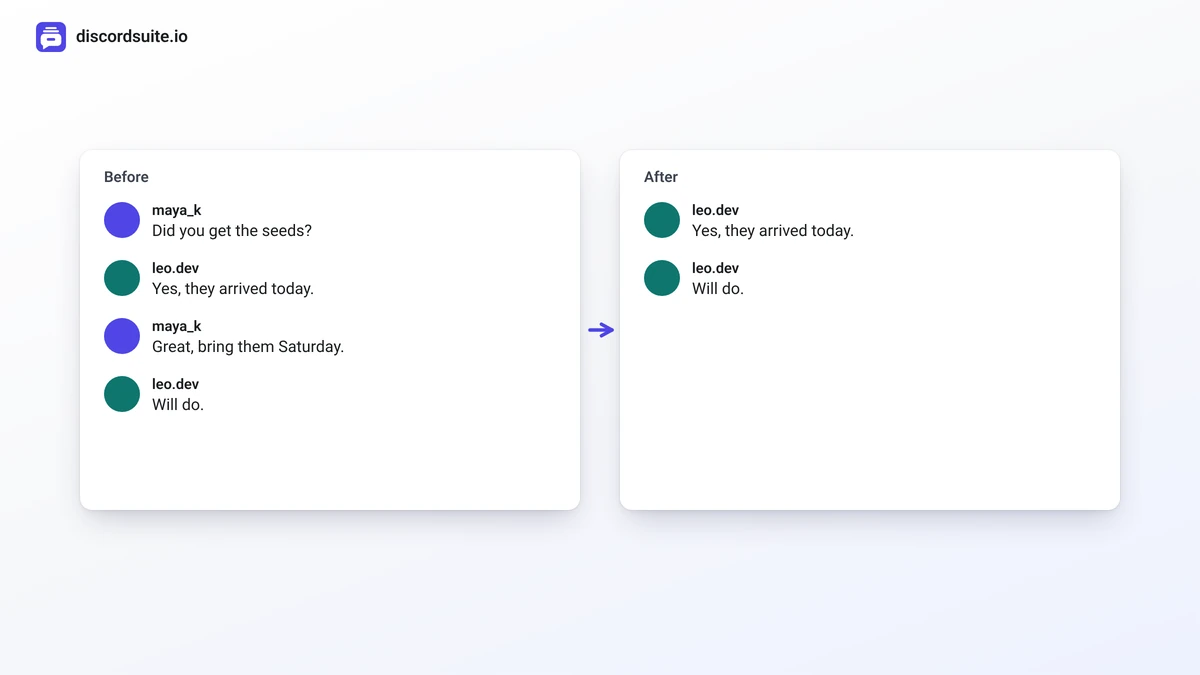
Your own messages only.
Message Cleaner deletes ordinary messages and replies you sent. It does not delete other people's messages, even if you are a server admin.
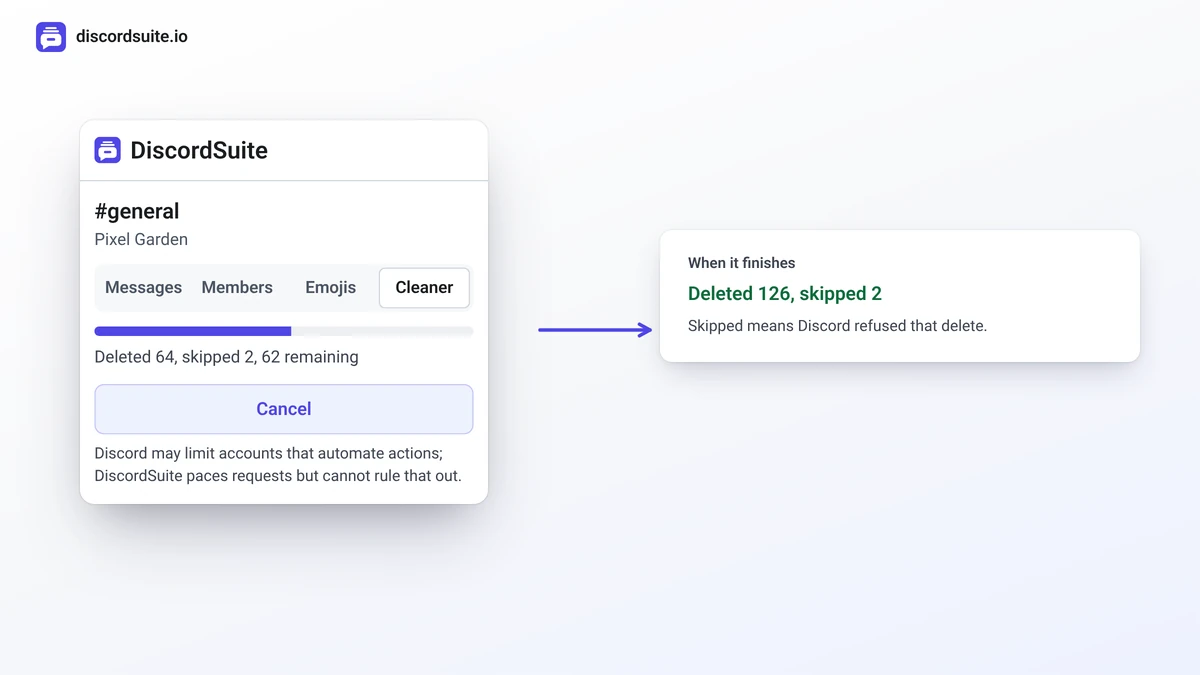
Paced deletes.
DiscordSuite waits at least 1.1 seconds between delete requests, and it also waits when Discord rate-limits the account.
More tools in one extension.
Media Downloader, member list export, the emoji and sticker downloader and a favorite GIFs backup. Undiscord’s README describes deleting messages. It does not describe media, member list, emoji or sticker tools ¹.
Side by side
| Feature | DiscordSuite Message Cleaner | Undiscord |
|---|---|---|
| What it is | Browser extension for Chrome, Firefox and Edge; no userscript manager needed | Userscript: install a userscript manager such as Tampermonkey or Violentmonkey first ¹ |
| Where you get it | The Chrome, Edge or Firefox store | Greasy Fork or OpenUserJS ¹ ² |
| Deleting messages | Message Cleaner: your own ordinary messages and replies in the open DM, group DM, channel or thread, after you scan, type DELETE and tick a confirmation (Chrome, Firefox and Edge, v1.1.0) | Deletes messages in a channel or DM; set Author ID, Server ID and Channel ID, then click Delete ¹ |
| Count before deleting | Scan shows how many of your messages it found and their date span, and deletes nothing (Chrome, Firefox and Edge, v1.1.0) | Not described in its README as of November 2026 ¹ |
| Save a copy first | Chat Exporter saves the chat first: HTML, PDF, CSV, XLSX, JSON, TXT | Not described in its README as of November 2026 ¹ |
| Account risk | Discord may limit accounts that automate actions. Message Cleaner paces its deletes but cannot rule that out (Chrome, Firefox and Edge, v1.1.0) | README: any tool that automates actions on user accounts, including this one, could result in account termination ¹ |
| Other tools | Built in: Chat Exporter, Media Downloader, member list export, emoji and sticker downloader, favorite GIFs backup (Chrome, Firefox and Edge, v1.1.0) | Not described in its README as of November 2026 ¹ |
| Plan | Free includes a limited lifetime total of deletions; Message Cleaner (or the All tools bundle) has no limit (Chrome, Firefox and Edge, v1.1.0) | No paid plan described; the README links a donation page ¹ |
Sources: ¹ github.com/victornpb/undiscord README · ² greasyfork.org/en/scripts/406540-undiscord-delete-all-messages-in-a-discord-channel-or-dm-bulk-deletion (v5.2.6, updated Dec 22, 2025)
Is it safe?
Any tool that deletes messages for you can put an account at risk. Undiscord’s README warns that any tool that automates actions on user accounts, including Undiscord, could result in account termination. The same applies to DiscordSuite: Discord may limit accounts that automate actions. Message Cleaner's pacing does not make it safe, undetectable or ban-proof, and we do not know how Discord will treat an account. Deleted messages are gone from Discord. Read Is a Discord chat exporter safe? before you decide.
Is Message Cleaner free like Undiscord?
Scan does not use the deletion allowance. Delete does. DiscordSuite's free plan includes a limited lifetime total of deletions. Message Cleaner (or the All tools bundle) has no limit. Chat export is free in every format. See pricing.
Verdict: which should you choose?
Choose DiscordSuite. It installs from your browser's store, scans before it deletes, deletes only your own messages after you type DELETE, and sits next to Chat Exporter so you can save a copy first. To get started, read how to delete all your Discord messages.
Sources
- Undiscord README, github.com/victornpb/undiscord (read November 19, 2026): https://github.com/victornpb/undiscord/blob/master/README.md
- Undiscord on Greasy Fork (v5.2.6, updated December 22, 2025): https://greasyfork.org/en/scripts/406540-undiscord-delete-all-messages-in-a-discord-channel-or-dm-bulk-deletion
Frequently asked questions
What is the best Undiscord alternative?
Choose DiscordSuite. Message Cleaner installs from the Chrome, Edge or Firefox store with no userscript manager, deletes only your own ordinary messages and replies after you scan, type DELETE and tick a confirmation, and sits in the same extension as Chat Exporter so you can save a copy first.
Does DiscordSuite need a userscript manager like Undiscord?
No. Undiscord is a userscript for deleting the messages in a Discord channel or DM, not a browser-store extension. Undiscord’s README tells you to install a userscript manager such as Tampermonkey or Violentmonkey first, then add Undiscord from Greasy Fork or OpenUserJS ¹. DiscordSuite is a browser extension for Chrome, Firefox and Edge, installed from the browser's store.
Can DiscordSuite export my messages before I delete them?
Yes. Chat Exporter saves the chat as HTML, PDF, Excel, CSV, JSON or TXT. Undiscord’s README describes deleting messages. It does not describe exporting them ¹. Deleted messages are gone from Discord, so export first.
Can Message Cleaner get my account banned?
Discord may limit accounts that automate actions, and no tool can promise otherwise. Undiscord’s README warns that any tool that automates actions on user accounts, including Undiscord, could result in account termination. Message Cleaner waits at least 1.1 seconds between delete requests and also waits when Discord rate-limits the account, but that does not make it safe, undetectable or ban-proof.
Can Message Cleaner delete other people's messages?
No. It deletes only ordinary messages and replies you sent, in the DM, group DM, channel or thread you have open. Being a server admin does not change that.
Is Message Cleaner free?
Scan is free and deletes nothing. Free includes a limited lifetime total of deletions. Message Cleaner (or the All tools bundle) has no limit. See pricing.