How to download all attachments from a Discord channel
How do I download all attachments from a Discord channel?
Discord has no bulk download for a channel's files. Media Downloader works on the conversation you have open in your browser:
- 1
Open discord.com in Chrome, Firefox or Edge and click into the channel, thread or DM.
- 2
Click the DiscordSuite icon and stay on the Messages tab.
- 3
Tick Media only.
- 4
Under Media types, choose Videos or the other types you need. To narrow the set, type endings under Extensions.
- 5
Optional: set From and To dates, or the first or last N messages.
- 6
Click Export and save the ZIP.
The sections below cover videos, other attachments, filters and what the ZIP holds.
What do I need?
- Chrome, Firefox or Edge on a computer. DiscordSuite doesn't run in the Discord desktop app or on phones.
- Discord open at discord.com, signed in with an account that can see the channel.
- DiscordSuite for Chrome, Firefox or Edge, with Media Downloader (or the All tools bundle) activated. Paste your license key under License and click Activate.
Media-only export has no free allowance. Compare plans. How DiscordSuite works covers installing and pinning the extension, and the Media downloader page sums up the tool.
How do I save only the videos?
- 1
Open the channel, thread or DM.
- 2
Open DiscordSuite and tick Media only.
- 3
Under Media types, tick Videos and untick the rest.
- 4
Optional: type
mp4(or other endings) under Extensions. - 5
Click Export and save the ZIP.
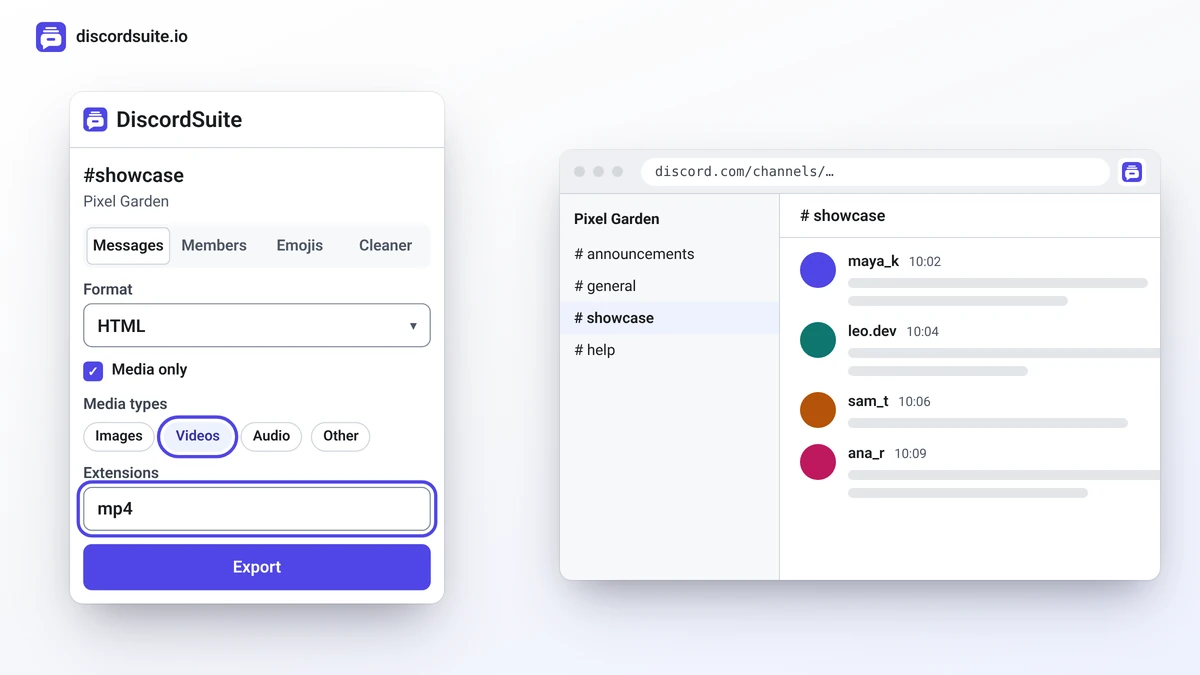
Filtering is not conversion. An mp4 filter keeps the mp4 files; it doesn't turn other video files into mp4.
How do I save attachments and other files?
This is how you download multiple files at once: every match goes into the same ZIP. Under Media types, choose Audio, Other, or any mix of types. Other covers files that aren't images, videos or audio, such as documents and archives.
Other on its own isn't "all files". To take every attachment type, and all the media in the conversation, select Images, Videos, Audio and Other.
For an image-led walkthrough, see How to download all images from a Discord channel.
How do I filter by extension or by date?
Extensions
type the endings you want, for example
png, jpg, mp4. DiscordSuite saves only files with those endings, from the media types you ticked. To keep only PDF and ZIP files, tick Other and typepdf, zip.Dates
From and To are in UTC, and both days are included.
Message count
use the first or last N messages.
Message filters
open Filters to keep the files from certain messages, for example one person's. See message filters.
For a full-history media job, leave the dates and the message count empty.
What is in the ZIP?
- The matching files, in one ZIP.
manifest.csv, a file list that marks each item as saved, failed or duplicate.
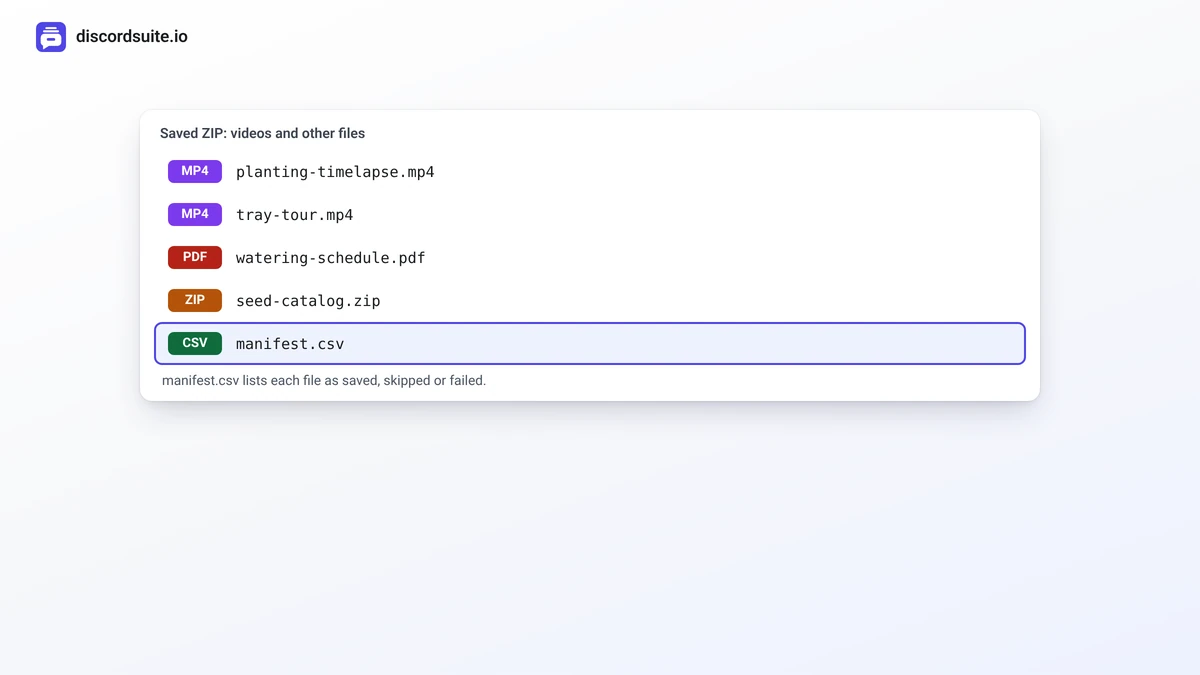
Files posted more than once are saved once, even when they were uploaded under different names. If the ZIP holds fewer files than you expected, that can mean filters, skipped duplicates or failed items. Check the types and extensions you chose, the date or message range, and manifest.csv.
DiscordSuite already retries a failed download during the export. If some files still fail, the screen for the finished export shows a Retry 3 failed files button. The number is how many files failed; for one file it reads Retry 1 failed file. It downloads only those files again, into a separate ZIP whose name ends in -retry.zip, with its own manifest.csv. The button belongs to the export that just finished; once you start another export, it's gone.
What if I want the messages too?
Media only saves the files without a chat file. For the conversation and its files together, use Download attachments instead. That option needs Chat Exporter (or the All tools bundle): the chat export and the files come in one ZIP. See How to export a Discord chat and How to back up Discord server messages. For a paged copy of the messages, see How to save a Discord chat as a PDF.
Media only can't be combined with Only new messages since last export. While Media only is ticked, DiscordSuite turns that option off. To get recent media, use a date range or Last N.
Can I download files from several channels?
Yes. Several channels at once needs Chat Exporter as well (or the All tools bundle). Tick Export several channels, choose the channels and threads, and run a media-only export. How to back up Discord server messages covers several-channel runs.
Are GIFs, emojis and stickers attachments?
Only when someone uploaded the file. A GIF sent from Discord's GIF picker is a link, so to keep the ones you starred, see how to download your favorite Discord GIFs. A server's custom emojis and stickers aren't attachments either; see How to download Discord emojis and stickers.
Frequently asked questions
Can I download all attachments from a Discord channel?
Yes, from a channel, thread or DM you can open, into one ZIP, with Media Downloader. Discord has no built-in bulk download. Tick Media only and select every media type (Images, Videos, Audio and Other).
Can I download multiple files at once?
Yes. That is the point of the ZIP. You can also filter by type or extension.
Are duplicate files downloaded twice?
No. Duplicates are skipped. The ZIP includes a file list.
Does this also save the messages?
No. This is a media-only ZIP. Use Chat Exporter with Download attachments if you want the messages and the files together.
Can I download only videos?
Yes. Choose Videos. You can also type extensions such as mp4 to narrow the set. That does not convert other files.
Can I download one file extension?
Yes. Type the endings you want, such as mp4 or png, jpg.
Can I paste a Discord message link to download its files?
No. Media Downloader does not download from pasted links or Discord CDN URLs. Open the channel, thread or DM in your browser first.
Can Media only download only new files since my last export?
No. Media only cannot be combined with Only new messages since last export. Use a date range or Last N instead.
Is media-only export included on the free plan?
No. Media-only export needs Media Downloader (or the All tools bundle) and has no free allowance.
Why are files missing from the ZIP?
Check the types and extensions you chose, the date or message range, and manifest.csv for failed or duplicate items. Duplicates are saved once. If some files failed, the finished export shows a button such as Retry 3 failed files, which downloads only those files again.
Can I download files from a thread or a DM?
Yes, if that conversation is open in your browser. The steps are the same as for a channel.
Can I download voice messages?
Choose Audio. Files are saved as Discord provides them. Filtering is not format conversion.
Related: Media downloader · How to download all images from a Discord channel · How to export a Discord thread · How to back up Discord server messages · Message filters · How DiscordSuite works